
The “Lego” System of the Digital World
If you are new to the world of AI, the first tool you should know is n8n. Think of n8n as the “glue” that connects all your favorite apps together to make them work automatically while you sleep.
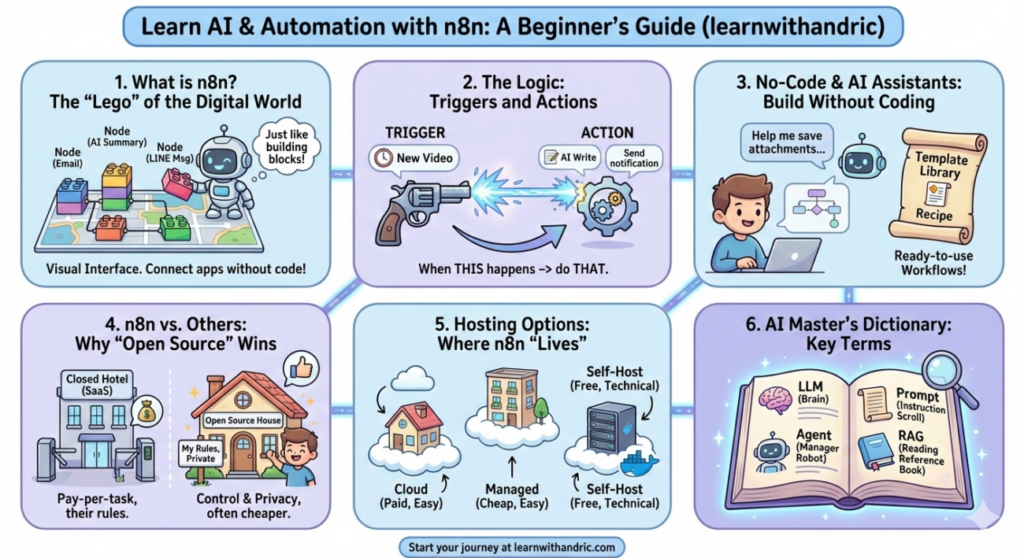
The Concept of “Nodes” (节点) In n8n, everything is built using “Nodes.” A node is simply a block that performs one specific task.
- Example: Imagine you have a box of Legos. One piece is “Read an Email,” another piece is “Summarize with AI,” and a third piece is “Send a LINE Message.” n8n is the platform where you snap these pieces together to build a functional machine.
Why it matters for Newbies: Usually, connecting different apps requires writing complex computer code. n8n changes that by using a Visual Interface. Instead of typing lines of code, you draw lines between boxes. It turns “programming” into “designing a map.”
Understanding the Logic: Triggers and Actions
Every automated “AI Agent” follows a very simple logic: “When THIS happens, do THAT.” In technical terms, we call these Triggers and Actions.
1. The Trigger (触发器) This is the starting gun. It is the event that tells n8n to start working.
- Example: “Every morning at 8:00 AM” or “Whenever I am mentioned in a Telegram group.”
2. The Action (动作) This is what the computer actually does once the trigger happens.
- Example: “Search Google for news about AI” or “Translate this text into Chinese.”
A Real-Life Example: Imagine you want to stay updated on a specific hobby, like photography.
- Trigger: A new video is posted on a specific YouTube channel.
- Action 1: n8n sends the video transcript to an AI (like ChatGPT).
- Action 2: The AI writes a short summary.
- Action 3: n8n sends that summary to your phone. This entire process happens in seconds, saving you from watching a 20-minute video just to get the main points.
No-Code & AI Assistants: Building Without Programming
The biggest fear for AI beginners is: “I don’t know how to code.” With n8n, that fear is gone. n8n belongs to a movement called Low-Code/No-Code.
The AI Assistant in n8n n8n now includes an AI Chatbot inside the editor. If you aren’t sure how to build something, you can literally talk to the tool in plain English or Chinese.
- Example: You can type, “I want to save my Gmail attachments to Google Drive,” and the AI will suggest which “Nodes” you need and how to connect them.
Templates (模板) You don’t have to start from a blank screen. n8n has a library of thousands of ready-to-use “Workflows.” You can simply find one you like, click “Import,” and it’s ready to go. It’s like using a recipe instead of trying to invent a new dish.
n8n vs. Zapier vs. Make: Why “Open Source” Wins
When you search for “automation,” you will find tools like Zapier or Make. While they are famous, n8n has a secret power: it is Open Source.
1. SaaS (Software as a Service) – Zapier/Make These are “Closed” platforms. You pay a monthly fee, and your data lives on their servers. If you run too many tasks, they charge you extra money.
- Example: It’s like staying in a hotel. It’s convenient, but you pay per night, and you must follow their rules.
2. Open Source – n8n Open Source means the “recipe” for the software is public. You can take n8n and put it on your own computer or a private server.
- Example: It’s like owning your own house. You can change the walls, paint the rooms, and nobody can tell you how many guests (tasks) you can have. It is much cheaper and more private in the long run.
Where does n8n “Live”? Understanding Hosting
For an AI automation to work 24/7, n8n needs to be “online” all the time. This is called Hosting or Deployment.
1. Cloud Hosting (e.g., n8n Official Cloud) You pay the company to handle the technical stuff. You just log in and use it.
- Example: Using Netflix. You don’t care how the movie gets to your screen; you just press play.
2. Managed Deployment (e.g., Zeabur) This is the “middle ground.” Platforms like Zeabur let you install n8n with one click for a very low cost (around $5/month).
- Example: Like renting an apartment that comes with furniture. You still pay rent, but it’s much cheaper than a hotel (Zapier).
3. Docker (Self-Hosting) Docker is a tool that lets you run n8n on any computer easily. It’s like a “digital shipping container” that has everything n8n needs inside it.
- Example: If you have an old laptop at home, you can use Docker to turn it into your own private AI server for $0.
The AI Master’s Dictionary: 22 Terms Simplified
To finish our introduction, let’s break down the 22 most important terms from my “AI Glossary” post with simple examples for each:
- LLM: The “brain” (ChatGPT/Gemini).
- Generative AI: AI that creates (Midjourney makes art).
- Prompt: The instruction (“Write a poem”).
- Hallucination: When AI lies (Saying a person died when they are alive).
- Multimodality: AI that sees and hears (Analyzing a photo you uploaded).
- Context: AI’s memory of the current chat.
- API: A bridge between apps (Letting n8n talk to Telegram).
- API Key: The password for that bridge.
- Token: How AI measures work (1 word is roughly 1-2 tokens).
- OCR: Reading text in images (Scanning a receipt).
- Workflow Automation: Linking tasks (If A happens, do B, then C).
- Fine-tuning: Giving AI a “specialty” (Training it on your specific writing style).
- Diffusion Model: How AI draws pictures.
- Prompt Engineering: Writing better instructions to get better results.
- Context Engineering: Organizing the background info you give to AI.
- Vector Database: A library where AI stores the “meaning” of words.
- Embeddings: Turning words into numbers so the computer understands them.
- RAG: Giving the AI a “textbook” to look at so it doesn’t lie.
- Transformer: The engine inside modern AI (The “T” in GPT).
- Local LLM: Running AI on your own computer (Privacy focus).
- MCP: A new standard to connect different AI models easily.
- Agent: An AI “Manager” that can complete a whole project by itself.