
We are living in the “Golden Age” of Artificial Intelligence. Every single morning, a new “revolutionary” tool is released. For a beginner, this is terrifying. Social media feeds are flooded with influencers screaming, “If you don’t use this AI, you’re obsolete!”
Have you ever signed up for five different AI waiting lists, bookmarked twenty tutorials, but ended up using none of them effectively?
You are not alone. This paralysis is caused by approaching AI backward. Here is a comprehensive, anxiety-free guide on how to actually choose AI tools that matter.
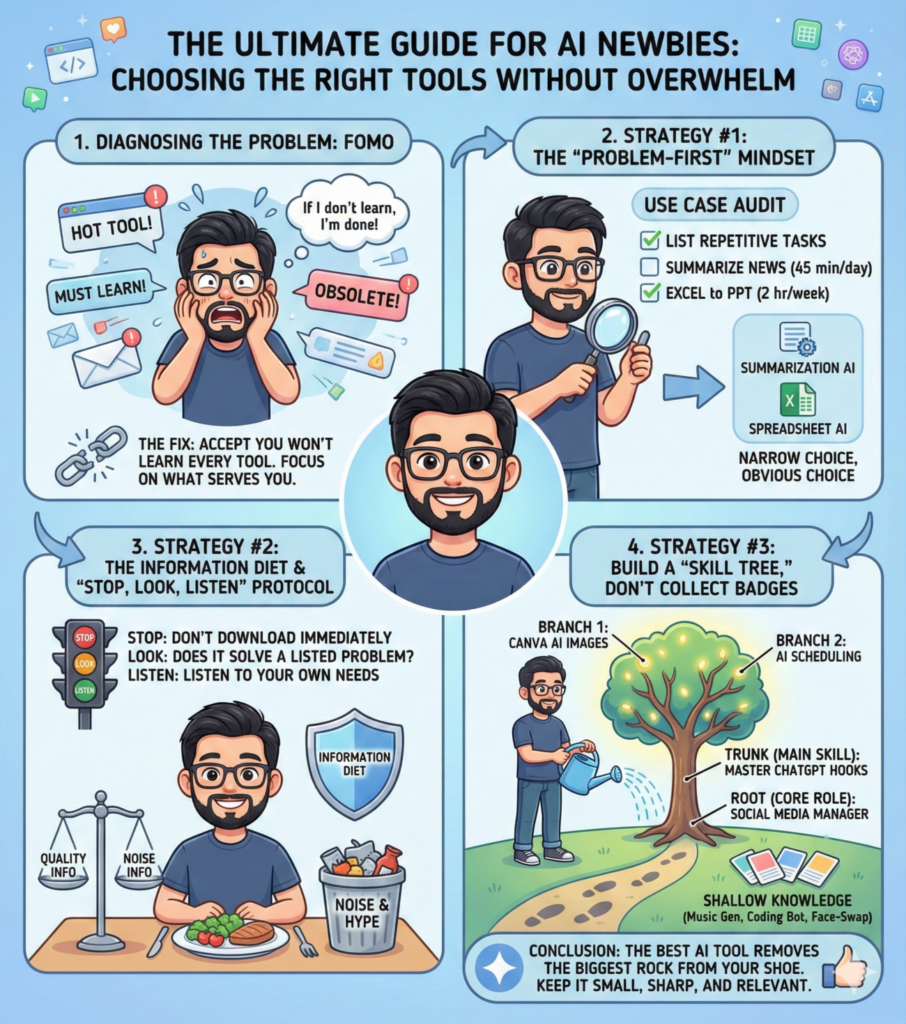
Diagnosing the Problem: FOMO
Before we pick a tool, we need to address the elephant in the room: FOMO.
- Term: FOMO (Fear Of Missing Out)
- Explanation: An anxious feeling that everyone else is getting ahead while you are falling behind. In the context of AI, it drives you to learn things you don’t need, just because they are popular.
- Example for Newbies: Imagine Sarah, an accountant. She sees everyone talking about Sora (an AI video generator). She spends 10 hours struggling to learn video prompts. But her job is numbers, not movies. She learned it out of fear, not utility. That is FOMO.
The Fix: Accept that you will never learn every AI tool. And that is okay. You only need to learn the ones that serve you.
Strategy #1: The “Problem-First” Mindset
Stop asking, “Which AI is the best?” Start asking, “What problem do I hate doing?”
To do this, you need to perform a Use Case Audit.
- Term: Use Case Audit
- Explanation: A systematic review of your daily or weekly routine to identify repetitive, boring, or time-consuming tasks.
- Example for Newbies:
- Vague Goal: “I want to use AI for productivity.” (This helps no one).
- Use Case Audit: “I spend 45 minutes every morning summarizing industry news for my boss.”
- Result: Now you don’t need a “general AI.” You specifically need an AI tool that specializes in summarization and web browsing (like Perplexity or a specific GPT wrapper). The choice becomes obvious.
Strategy #2: The Information Diet
Newbies often choke on too much information. To choose the right tools, you need to go on an Information Diet.
- Term: Information Diet
- Explanation: Deliberately restricting the amount of news and data you consume to preserve your mental energy for actual action. Quality over quantity.
- Example for Newbies: Instead of following 50 different “AI News” accounts on Twitter/X that bombard you with noise, choose one trusted weekly newsletter. Spend the rest of your time actually using a tool, not reading about it.
The “Stop, Look, Listen” Protocol: When you see a shiny new tool:
- Stop: Do not download it immediately.
- Look: Does this tool solve one of the problems you listed in your Use Case Audit?
- Listen: Listen to your own workflow needs, not the hype of the internet crowd.
Strategy #3: Build a “Skill Tree,” Don’t Collect Badges
Many beginners treat AI like Pokemon—”Gotta catch ’em all!” This leads to shallow knowledge. Instead, you should approach AI using the Skill Tree concept.
- Term: Skill Tree
- Explanation: A concept from video games (RPGs). You start with a main trunk (core skill) and only branch out to related skills that support that trunk. You don’t unlock random skills that don’t fit your character class.
- Example for Newbies:
- The Collector (Wrong way): Learns a music generator today, a coding bot tomorrow, and a face-swap app the next day. Master of none.
- The Skill Tree Builder (Right way):
- Root (Core Role): I am a Social Media Manager.
- Trunk (Main Skill): I will master ChatGPT to brainstorm 50 viral hooks in 10 minutes.
- Branch (Support Skill): Now that I have hooks, I need images. I will learn Canva AI specifically to illustrate these hooks.
- Result: Every tool chosen supports the main goal. The skills stack on top of each other to make you powerful.
Conclusion
Choosing an AI tool isn’t about looking at comparison charts or technical specs. It’s about looking at your own calendar.
The best AI tool for you is simply the one that removes the biggest rock from your shoe right now.
If a tool doesn’t save you time or solve a specific problem within the first week of using it, delete it. Keep your toolkit small, sharp, and relevant to you.